Managing the Sales Pipeline at a Startup
This article was machine-translated from Japanese by AI (Claude). It may contain errors. Read the original Japanese article.
When you set a goal like "X deals won" for early-stage startup sales activity, the number of deals in that goal inevitably ends up very small. In some cases, the goal may turn out to be a "one-deal win": "This quarter, secure one LOI worth at least 1 million yen."
But if you set it up that way, goal attainment becomes "zero or one," and you cannot manage progress. If you cannot manage progress, you cannot predict whether you will really achieve the goal, and if you cannot see progress, it is hard to maintain the team's momentum.
So when you set the KGI as "This quarter, secure one LOI worth at least 1 million yen," one approach is to manage progress using weighted amounts or deal counts as KPIs.
This is a basic method for people with sales experience, but people without it don't seem to know it well, so I'll explain it briefly.
The Basic Formula
You calculate progress by weighting amounts or deal counts by sales stage. However, I think it is better not to make this weighted expected amount itself the goal, but to position it strictly as a KPI for the KGI. The goal is actual revenue, and achieving the KPI without achieving that is meaningless. This is only for checking progress.
Amount-Based
Prospective deal amount × sales stage = expected amount
The total of the expected amounts is the KPI.
Deal-Count-Based
Number of deals with prospective customers × sales stage = expected deal count
The total of the expected deal counts is the KPI.
Managing It in Google Sheets
You should not spend a lot of time on this kind of deal management. So at first, something like Google Sheets is fine. It will change later anyway. Try starting by making a simple table like the one below.
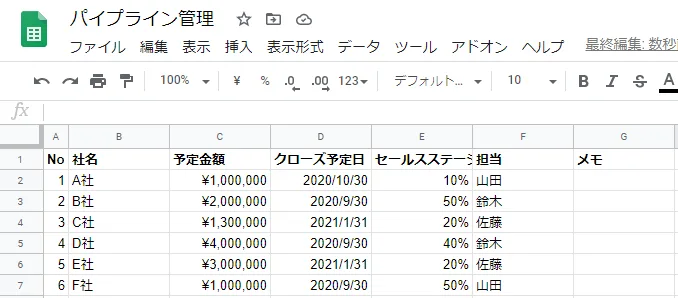
Calculation Example
Suppose the goal for Q3 2020 is "win deals worth at least 5 million yen." Looking at the deals in the table above, the amount-based KPI calculation for Q3 2020 is
Company A: 1 million yen × 10%- Company B: 2 million yen × 50%
Company C: 1.3 million yen × 20%- Company D: 4 million yen × 40%
Company E: 3 million yen × 20%- Company F: 1 million yen × 50%
which comes to 3.1 million yen. (Note: the struck-through lines are excluded from the calculation because they will not close by 9/30.)
So at this point, 3.1/5 = 0.62 (62%) is the progress rate on the KPI.
If the goal is instead deal-count-based, "win two or more deals worth at least 1 million yen," then 50% + 40% + 50% = 1.4 deals. So 1.4/2 = 0.7 (70%) is the progress rate.
Managing It in a CRM
Another option is to use a CRM instead of Google Sheets.
If you set up HubSpot CRM (free) for now and install the Outlook or Gmail add-in, all your email logs and contacts will accumulate in HubSpot CRM. You can also link deal management to that contact information, and you can share deal progress with other team members, which makes management easier. (However, if it seems like a hassle, don't hesitate to use Google Sheets. If it's a hassle and the CRM stops being updated, it's pointless.)
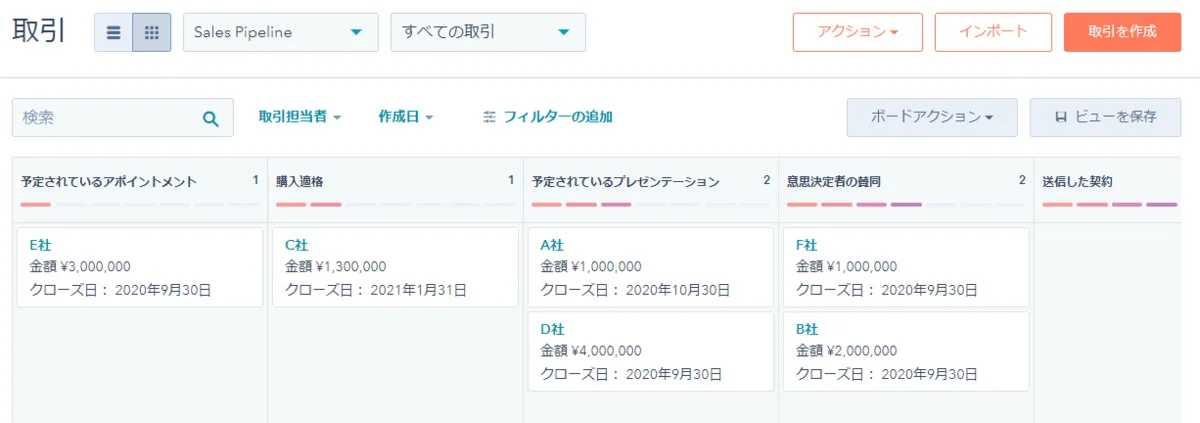
Also, from the on-screen menu, go to [Reports] -> [Dashboards], create a dashboard from the "Sales" template, and set the "Deal forecast by stage" report to "This quarter." Then you can automatically pull in the quarter's forecast.
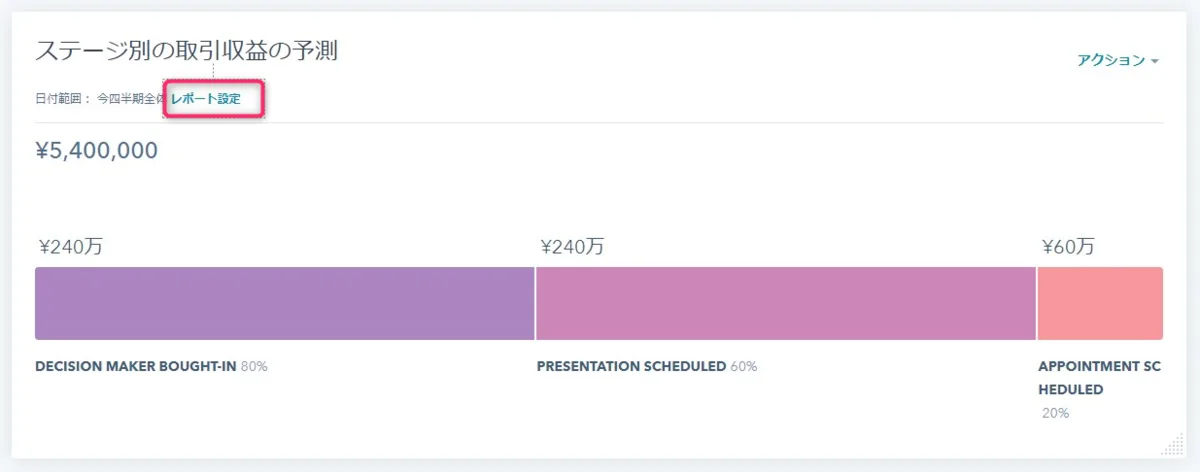
Defining Sales Stages
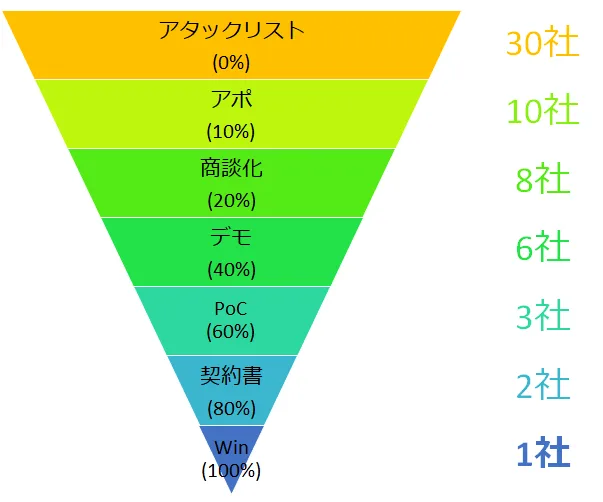
You should set them according to your own company's sales cycle and process, but if you don't yet know that cycle, set them on a hypothesis basis for now. Personally, my impression is that getting an appointment is 10%, and being able to demo to the decision maker is finally 40%.
If you use HubSpot, it may be good to use HubSpot's standard sales stages (though I feel the standard ones are a bit too rough). Personally, I think it's good to create a 0% stage and also include a stage for the attack list (the list of people you plan to contact).
Work Backward from the Goal to the Number of Deals You Need
Based on the goal amount or deal count, try working backward to figure out how many prospective customers you need.
From my experience so far, I think contacting about 30 prospects for every one win is about right. With cold email, getting appointments from one in five is doing well. If you also make good use of existing connections, I think this conversion would be higher, but even so, I suspect many teams would still be at the point of wondering whether they can get appointments with even 10 of them.
Other Information
Please also refer to HubSpot's article on pipeline management.
I also explain it briefly in a video.